


Restore deleted presentations
Find a presentation you deleted in Trash and bring it back, or remove it for good.
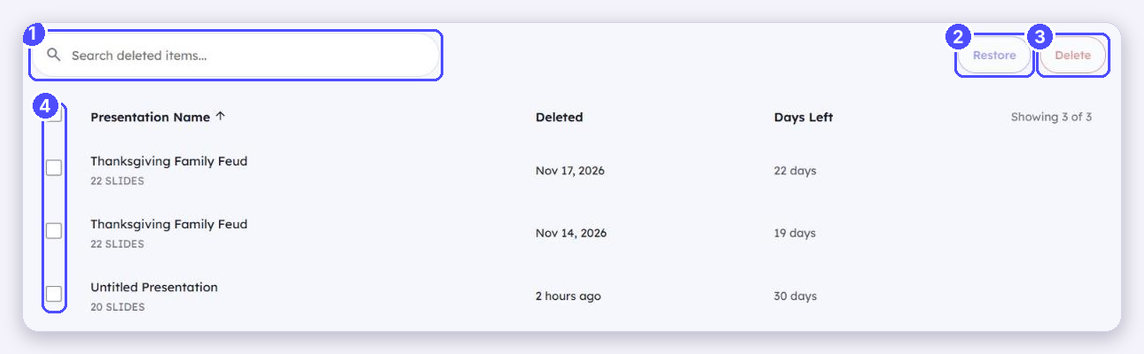
Trash: 1 Search deleted items, 2 Restore, 3 Delete, 4 Select with the checkboxes.
Steps
- Open TrashIn the left sidebar, under Account, choose Trash.
- Find the presentationEach row shows the Presentation Name, the number of slides, when it was Deleted and the Days Left. Use "Search deleted items..." to find one by name.
- Select itTick the checkbox next to the presentation. The box at the top selects every row. The Restore and Delete buttons become active once something is selected.
- Choose Restore or DeleteRestore puts the presentation back in your account. Delete removes the selected items from Trash, so use it only when you are sure.
Tip
The Days Left column counts down for each item, so restore anything you still need well before it runs out.
Frequently asked questions
How do I delete a presentation?
Use the three-dot menu on its card in My Presentations and choose Delete. It moves to Trash.