


Select Answer
Ask a question, give your audience a few options, and mark which one is correct.
- Add the slide
Click New Slide on the left. In the Quiz Slides group, choose Select Answer.

- Write your question and options
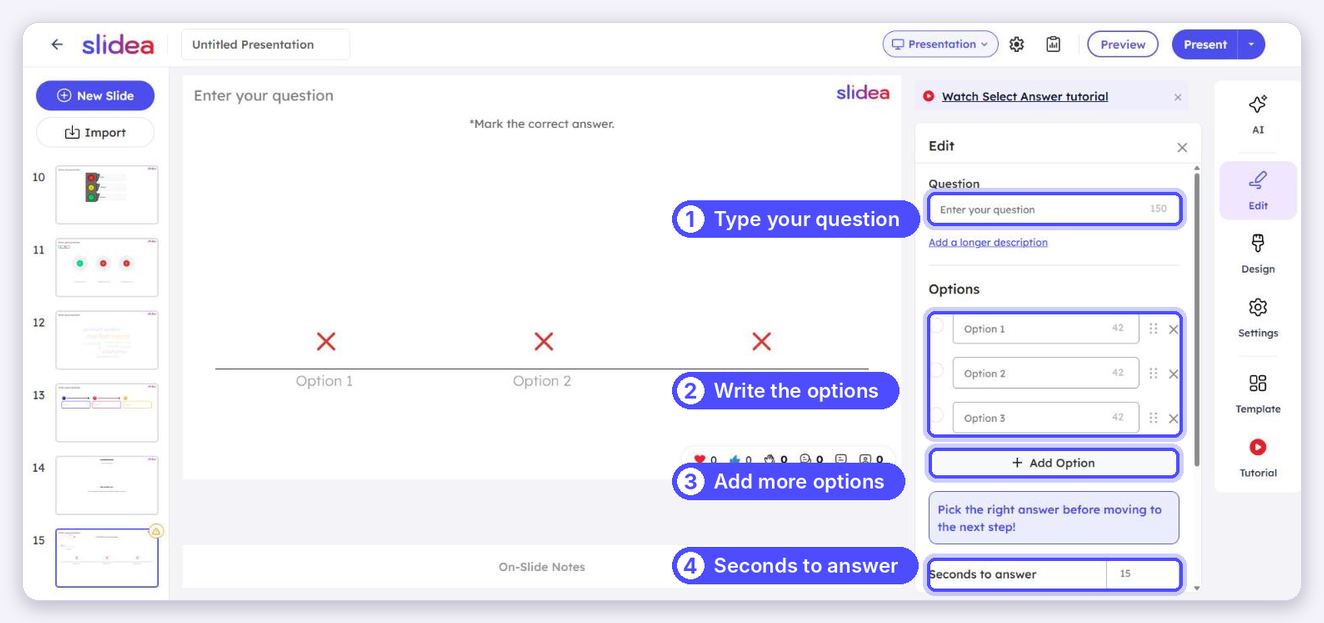
In the Edit tab, type your prompt in Question, then fill in the Options. Click the circle next to the correct option to mark it, and click Add Option to add more. Set Seconds to answer to choose the time limit.
Tip
Mark the correct answer before you move on. The panel reminds you to pick the right answer first.
How many options does a new slide start with?
A new Select Answer slide starts with three options. Click Add Option to add more.
How long do people have to answer?
That is set by Seconds to answer in the Edit tab. A new slide starts at 15 seconds.