


Lineup
Give your audience a set of items and ask them to put them in the correct order.
- Add the slide
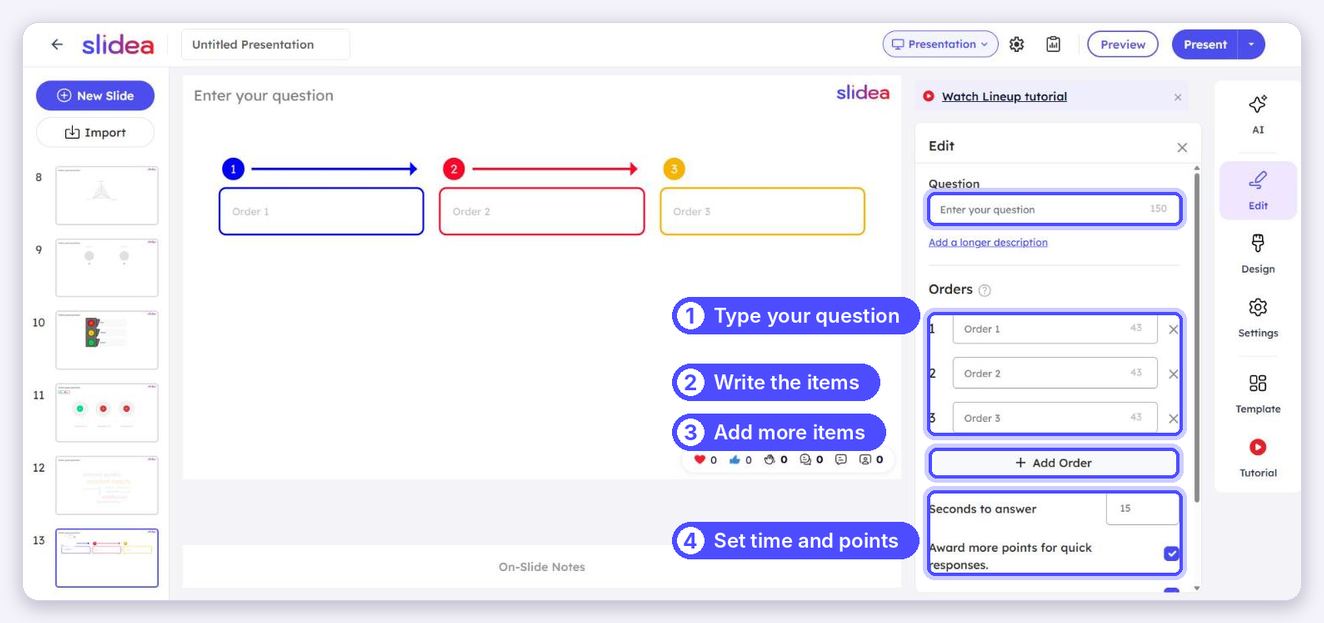
Click New Slide on the left. In the Quiz Slides group, choose Lineup.

- Write your question and the order
In the Edit tab, type your prompt in Question. Under Orders, enter the items in the correct order, and click Add Order to add more. Set Seconds to answer, and tick Award more points for quick responses if you want faster answers to score higher.
Tip
Enter the items in the correct order. This is the order your audience has to match.
How many items does a new slide start with?
A new Lineup slide starts with three items. Click Add Order to add more.
Can I set a time limit?
Yes. Use Seconds to answer in the Edit tab. A new slide starts at 15 seconds.