


Q&A
Let your audience send you questions during a presentation, then answer them from the slide.
- Add the slide
Click New Slide on the left. In the Brainstorming & Interactive Slides group, choose QA.

- Choose how questions are asked
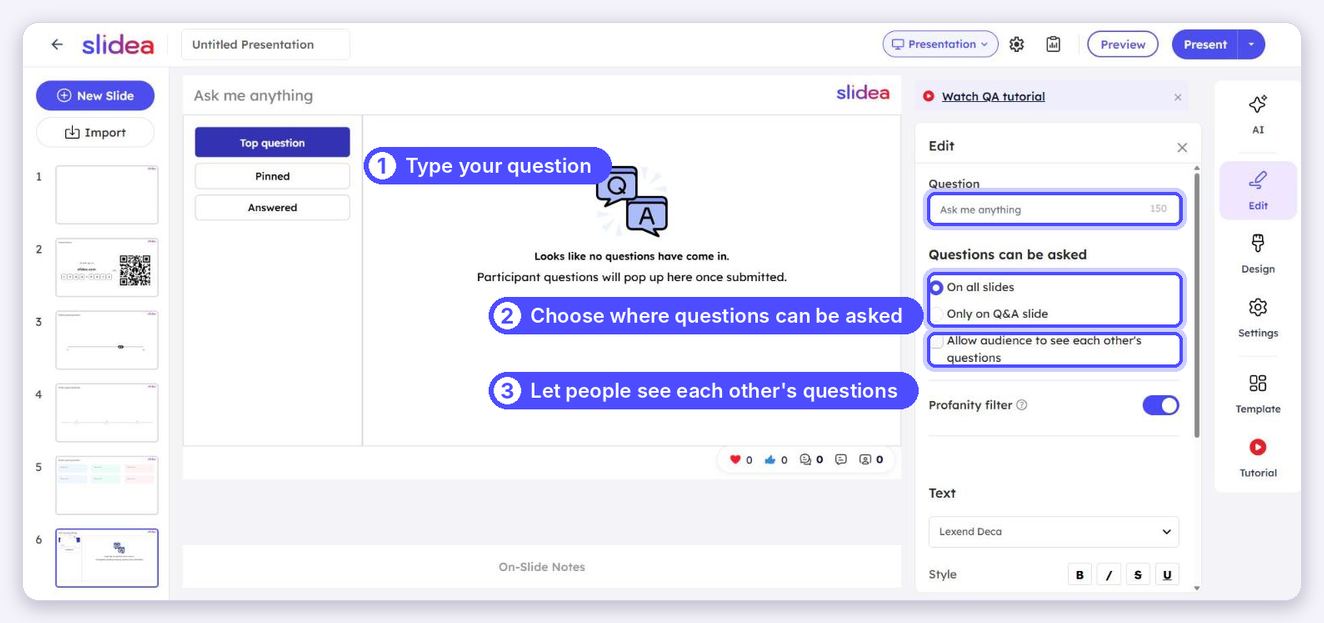
In the Edit tab, under Questions can be asked, pick On all slides or Only on Q&A slide. You can also let the audience see each other questions and use the Profanity filter.
Tip
The slide organizes questions under the Top question, Pinned and Answered tabs, so you can keep track as they come in.
When can the audience ask questions?
That depends on Questions can be asked in the Edit tab: On all slides or Only on Q&A slide.
Can people see the questions from others?
Yes, if you turn on Allow audience to see each other’s questions in the Edit tab.