


Guess the Number
Ask a question with a number as the answer. Your audience guesses on their phones, and you set the correct answer and the range of allowed guesses.
- Add the slide
Click New Slide on the left. In the Brainstorming & Interactive Slides group, choose Guess the Number.

- Fill in the Edit panel
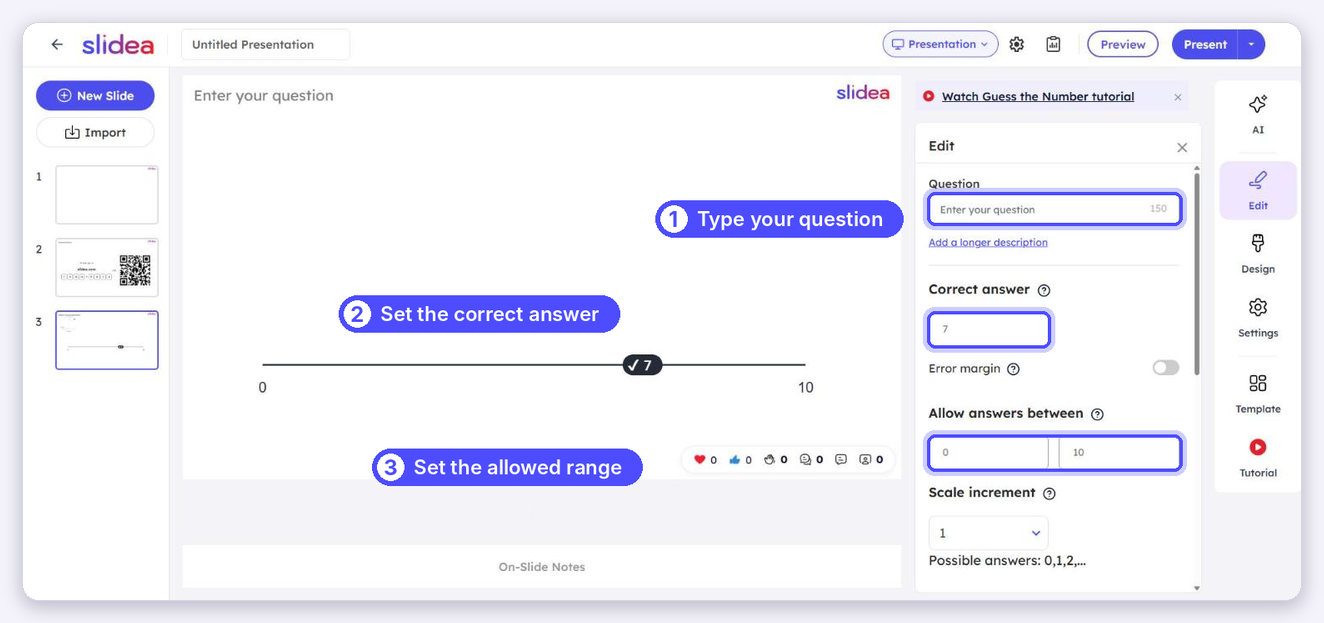
In the Edit tab, type your Question, enter the Correct answer, and set Allow answers between to the lowest and highest number people can guess.
Tip
Scroll down in the Edit tab to change the Scale increment, which sets the steps between possible answers (for example 1, 2, 3).
What does Error margin do?
Error margin is a switch in the Edit panel, next to the Correct answer field. Turn it on to set how far from the correct answer a guess can be.