


HR Teams
Hear honest feedback from every employee.

Slidea Live Q&A is an audience Q&A tool: people ask questions from any phone, upvote the best ones, and you see them on screen in real time. You can moderate every question as it comes in. It’s great for presentations, meetings, classes, and events.

Collect audience questions, moderate what appears on screen, understand
what people care about, and take insights wherever they need to go.
Let people ask questions without
sharing their name.
Let AI draft your presentation,
then add a Q&A slide in one click.
Audience votes bring the best
questions to the top.
Pin a question, mark it as answered, and let
the profanity filter catch bad words.
Show a QR code or an 8-digit code.
People join in seconds.
Download every question as Excel or PDF
to follow up after the session.
No setup call, no template to buy, no app for anyone to install.
Build it, show the code, hear the room.
Start from scratch or pick one of the ready-made Q&A templates. Change colors and styles to match your topic.

Show the QR code, or tell people to go to slidea.com and type your 8-digit code. No app, no sign-up. They type a question (up to 200 characters) and tap Submit.

Questions pop up on your screen in seconds, and the most-upvoted ones rise to the top. Pin the one you’re answering, then mark it as answered to clear it from the list.
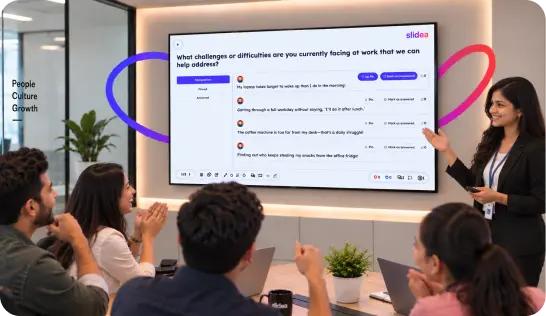
Four small settings and habits that get more questions.
Turn on “Questions on all slides” so people can ask during the talk, not only at the end.
Keep “See each other’s questions” off for HR and town halls. Turn it on so the room can upvote.
Ask one seed question yourself. Once the first question is up, others follow.
Pin the current question so everyone knows where you are, then mark it as answered.
Ask questions, collect instant responses, and
see live results.
Hear honest feedback from every employee.
Answer team questions and make faster decisions.

Let every student ask, even the quiet ones.

Manage live audience questions during sessions.

Choose the right question for every moment — from multiple choice and ratings to word clouds, Q&A, and more.
Explore templates designed for meetings, town halls, classrooms, and events.
Parent-Teacher Meeting Q&A Meeting Templa...

Anonymous Questions Q&A Presentation Temp...
Town Hall Q&A Session Ideas
45-Minute Team Meeting Quiz Questions
Testimonials
Don’t just take our word for it — see how Slidea is helping presenters connect with their audiences.

Higher Participation: “Slidea makes every lesson more engaging, helping us achieve a 92% quiz completion rate.”

More Engagement: “Assessment scores improved by 41%, and our training sessions became far more interactive.”
Read expert articles on live Q&A, audience engagement, moderation tips, and presentation design.
 Francis Xavier
 Saravana Kumar

Still have questions? Find the answers that help you get started with confidence.
Contact UsSlidea Live Q&A is a tool for collecting audience questions live on screen or through a link. People ask from any device, upvote the questions they care about most, and you answer them right away during your presentation, meeting, or class.
People scan the QR code on your screen, or go to slidea.com and type the 8-digit code. They can ask a question right away, with no app to download and no account to create.
Yes. Participants can ask without sharing their name, so quieter people and new team members feel comfortable speaking up. This often brings out the honest questions people would not ask out loud.
Questions are sorted by upvotes, so the most popular ones stay on top. Pin the question you are answering, then mark it as answered to move it to the Answered tab. The profanity filter is on by default.
It is your choice. By default, people only see their own questions. Turn on “Allow audience to see each other’s questions” when you want the room to read and upvote every question.
Yes. Set “Questions can be asked” to “On all slides”, and people can send questions at any point in your presentation. Choose “Only on Q&A slide” to keep questions for the end.
Yes. Each question can be up to 200 characters. That keeps questions short and easy to read on the big screen, and people can send more than one question if they need to.
Yes. Everyone in the session can upvote the questions they want answered. The most popular questions rise to the top, so you spend your time on what the room cares about most.
Yes. Slidea works with PowerPoint and Zoom, so you can run a Q&A next to your slides or in an online meeting. Your audience joins from any browser on any device.
Yes. A Slidea presentation can mix Q&A with live polls, quizzes, and word clouds, so you can warm up the room, check understanding, and take open questions from everyone in one session.
Yes. Pick a ready-made Q&A template for a town hall, classroom, conference, or team meeting, then change the questions and colors to fit your topic. You can also start from a blank slide.
Yes, on the Pro plan. You can export results as Excel or PDF, so you can follow up on open questions, share them with your team, or keep a record of the session.
Yes. Q&A is included in the free plan, so you can create a Q&A and start collecting audience questions right away. Paid plans add more participants, exports, and branding for larger sessions.
Look for easy joining with no app or sign-up, anonymous questions, upvoting, simple moderation like pinning and marking answered, a profanity filter, and the option to mix Q&A with polls and quizzes.
It’s free, fast, and easy: create your Q&A in minutes.
