Tip: Google may show results for “Slides” instead of “Slidea”.
Ask your audience to search “Slidea App”.

Start here

What is Slidea? — Slidea Help Center

What is Slidea?


Most decks are a one-way broadcast: you talk, the room listens. Slidea flips that — the moment you add an interactive slide, everyone in the room becomes part of the deck.

You build a presentation the way you normally would, but anywhere you’d usually pause and ask “any thoughts?”, you drop in a slide that actually collects the answer — a vote, a typed response, a ranked list, a guess. People join from whatever device is already in their hand, nothing to install, and what they submit shows up on your screen while you’re still talking.

Slidea is built for the moment right before or after that broadcast, too. Before, you can generate a first draft with AI instead of staring at a blank slide. After, every response you collected is sitting in a report, ready to export or revisit. Think of Slidea less as “another slideshow app” and more as the layer that sits between a static deck and the group of people looking at it — it’s what turns a presentation into a two-way conversation without you needing to switch tools mid-session.

It’s worth being clear about what Slidea is not. It isn’t a video-conferencing app — it doesn’t host your call or your webcam feed; you present it inside whatever meeting tool you already use, sharing your screen the same way you would with any other window. And it isn’t purely a quiz app either — quizzes with scoring are one part of the slide library, but content slides, open-ended discussion prompts, and self-paced surveys all live in the same deck, side by side.

Coming Soon · Video

~60s

Video: a fast product tour — starting from Home, generating a short deck with Create with AI, adding one interactive slide, running it live with a join code showing on screen, and landing on the results report. Should give a first-time viewer the full shape of a Slidea session in under a minute.

The three pieces of a session

  • A deck. Static slides for context, interactive slides for input, mixed in whatever order your session needs. A deck can hold Content and Instructions slides, PowerPoint or Google Slides imports, scored Quiz Slides like Select Answer or Lineup, and unscored Interaction Slides like Multiple Choice, Word Cloud, or Q&A.
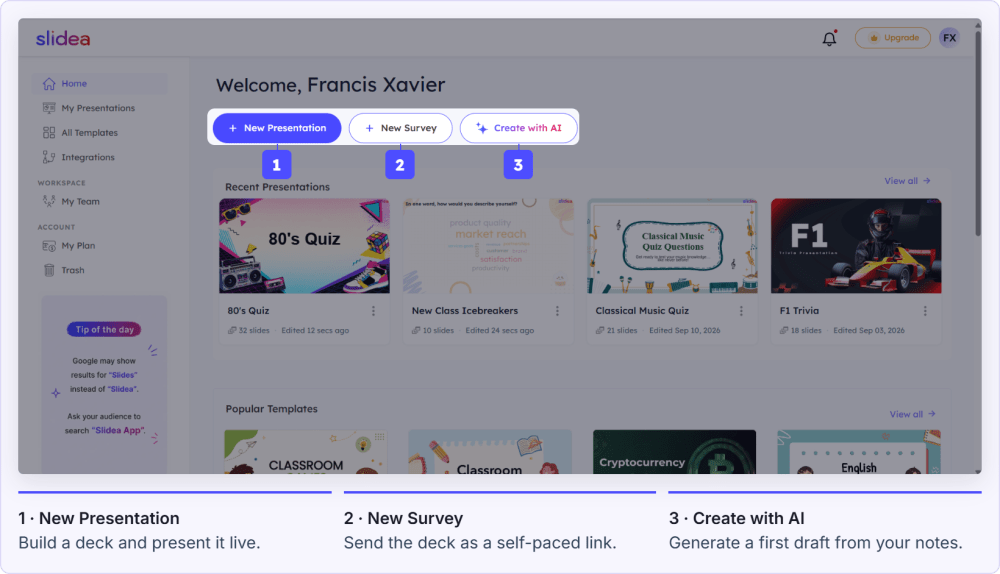
  • A room. Presented live to people in front of you or on a call using New Presentation, or sent out as a self-paced New Survey link people open on their own time. The deck itself doesn’t change between the two — only who controls the pace does.
  • A result. Every response lands in a report you can revisit, export, or turn into a leaderboard on the spot. Nothing is thrown away when the session ends — the data is the point.

These three pieces are also why Slidea tends to replace two or three separate tools at once for teams that adopt it: the deck-building tool, the live-polling tool, and the after-the-fact spreadsheet where someone used to copy responses by hand.

Coming Soon

Screenshot: the Home dashboard, showing New Presentation, New Survey, and Create with AI as the three entry points.

Everything starts from Home — build, generate with AI, or import.

Where to go next

Set up your account, then jump straight to building — your first interactive slide takes under a minute to add.

Frequently asked questions

Does my audience need an account or an app?

No. They open a browser, enter a short join code (or scan a QR code), and they’re in — no download, no sign-up.

What kinds of sessions is this actually for?

Anything where you’d benefit from knowing what a group thinks before you move on — team meetings, classes, training sessions, conference talks, workshops, and icebreakers all work well.

Do I need to be presenting live to use Slidea?

No. If nobody’s in the room at the same time, use New Survey instead of New Presentation — the same slide types work, but people complete it on their own schedule.

Is Slidea free to try?

Yes — the Free plan lets you build and run real sessions with no credit card required. Paid plans add things like more AI credits, a bigger template library, and features like Remote and private presentations.

Was this article helpful?