


Traffic Lights
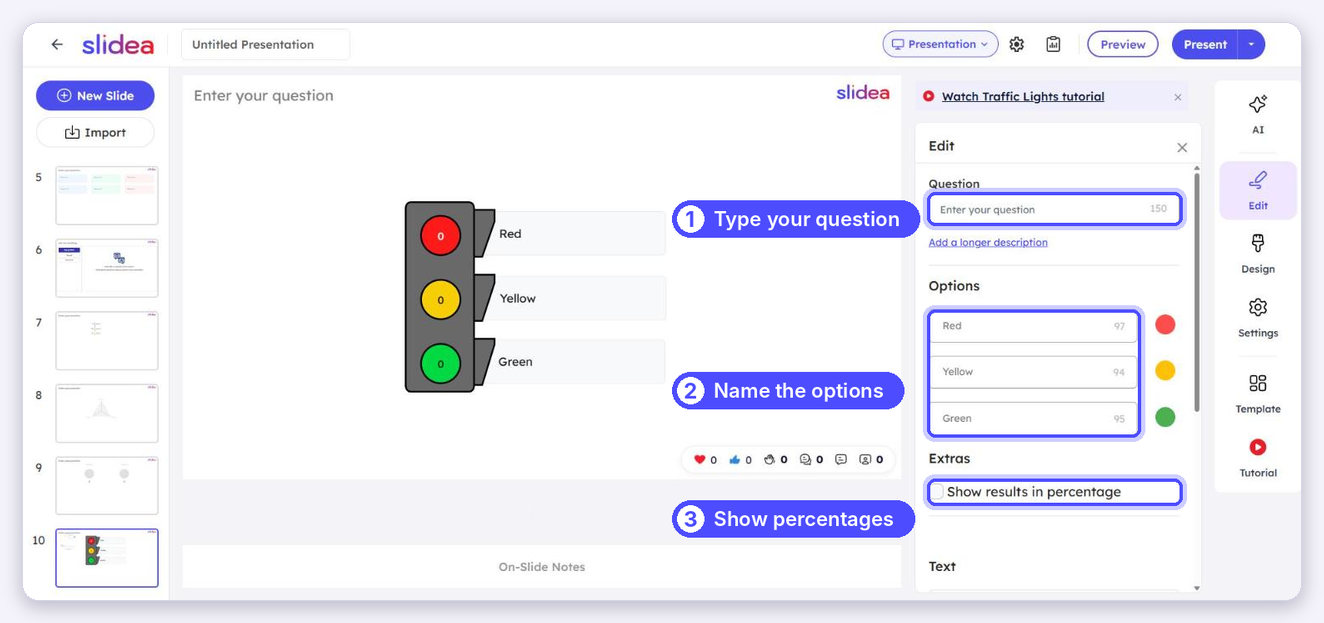
Ask a question and let your audience answer with a red, yellow or green light. The votes show up on the traffic light as they come in.
- Add the slide
Click New Slide on the left. In the Brainstorming & Interactive Slides group, choose Traffic Lights.

- Write your question and options
In the Edit tab, type your prompt in Question. Name the three Options (they start as Red, Yellow and Green). Under Extras, tick Show results in percentage if you want percentages.
Tip
Rename the options so each light has a clear meaning, for example Stop, Slow down and Go.
How many options are there?
A Traffic Lights slide has three options, one for each light.
Can I show results as percentages?
Yes. Tick Show results in percentage under Extras in the Edit tab.