


Pick the Number
Ask a question with a numeric answer and let your audience pick a number on a scale.
- Add the slide
Click New Slide on the left. In the Quiz Slides group, choose Pick the Number.

- Set the correct number and range
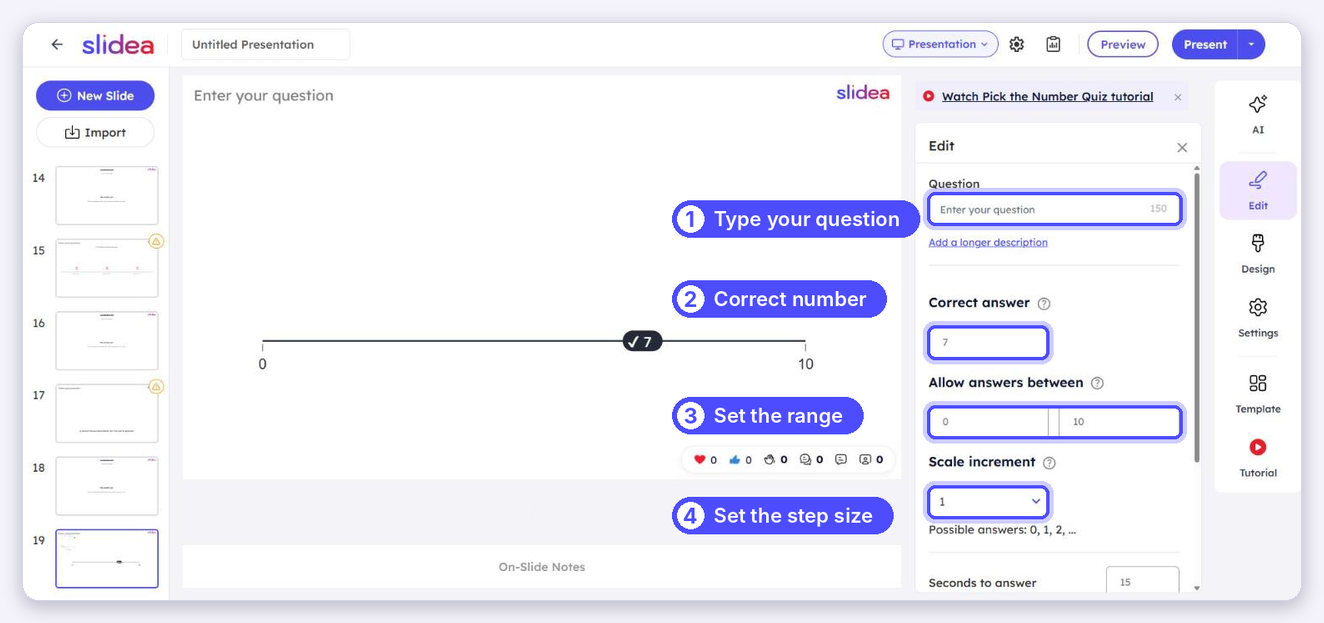
In the Edit tab, type your prompt in Question. Enter the Correct answer, then set Allow answers between to choose the lowest and highest number people can pick. Scale increment sets the step between numbers.
Tip
Check the line under Scale increment. It lists the possible answers, so you can see that your correct number is one of them.
What range does a new slide use?
A new Pick the Number slide allows answers between 0 and 10, with a scale increment of 1.
Can I set a time limit?
Yes. Use Seconds to answer in the Edit tab. A new slide starts at 15 seconds.