


A six-question Pokémon quiz can work as a classroom activity, family game, team icebreaker, or short event energizer. The number of questions matters less than their clarity, the time players receive, and how often the leaderboard interrupts the game.
The Slidea Pokémon Trivia Quiz Template contains 20 authored slides: six multiple-choice questions, six leaderboard slides, and eight content slides.
This guide explains how to check the answers, improve unclear wording, adjust the timer, and run the complete quiz in approximately 15 minutes.
In short:
- Open the public template page.
- Select Use Template.
- Review and edit the six questions.
- Adjust the answer time for your audience.
- Test one complete question in Preview.
- Show the leaderboard after questions two, four, and six.
How this Pokémon quiz template was tested
For this guide, the template was opened from its public page and reviewed inside the Slidea editor on September 9, 2026.
All six question slides were inspected. At the time of testing, each question had:
- A 15-second answer time
- A selected correct answer
- Faster-response points enabled
- The Add leaderboard option enabled
The final Snorlax question was also completed in Preview as a sample participant. The audience screen accepted the answer, the presenter revealed the correct response, and the following leaderboard displayed the participant’s score.
The test was limited to one preview participant. It was not a full multi-participant or network-load test, so hosts should test the presentation with their expected devices and connection before an event.
What is included in the template?
The 20 authored slides follow a repeating content–question–leaderboard pattern.
| Slide type | Slide numbers | Purpose |
| Content slides | 1, 2, 5, 8, 11, 14, 17, and 20 | Welcome players, introduce questions, and close the quiz. |
| Question slides | 3, 6, 9, 12, 15, and 18 | Present the six multiple-choice questions. |
| Leaderboard slides | 4, 7, 10, 13, 16, and 19 | Display the current rankings. |
The structure is easy to follow, but pausing on all six leaderboard slides can make a short quiz feel slow. A more balanced schedule appears later in this guide.
The six Pokémon quiz questions and answers
Host note: The table below contains all six correct answers. If participants could find this guide during the game, do not share the article until the final leaderboard—or replace at least two complete questions before presenting. Changing only the distractors or answer order will not prevent the original answers from being discovered.
| Question | Answer options | Correct answer |
| What type of Pokémon is Pikachu? | Fire, Electric, Grass | Electric |
| What is Charmander’s Pokémon category? | Turtle Pokémon, Lizard Pokémon, Dragon Pokémon | Lizard Pokémon |
| What does a trainer receive after defeating a gym leader? | Poké Ball, Playing Card, Gym Badge | Gym Badge |
| What type of Pokémon is Lugia? | Psychic/Flying, Fire/Flying, Water/Dragon | Psychic/Flying |
| Which Pokémon is said to control time? | Palkia, Dialga, Giratina | Dialga |
| What is Snorlax’s Pokémon category? | Sleeping Pokémon, Sprinting Pokémon, Fighting Pokémon | Sleeping Pokémon |
The answers were checked against official Pokémon sources:
- The official Pikachu Pokédex page lists Pikachu as the Electric type.
- The official Charmander Pokédex page lists Charmander’s category as Lizard.
- Pokémon’s official RPG introduction explains that a Gym Leader gives the Trainer a Badge after being defeated.
- The official Lugia Pokédex page lists Lugia as Psychic/Flying.
- The official Dialga page describes Dialga as a Pokémon said to control time.
- The official Snorlax Pokédex page lists its category as Sleeping.
Three questions to rewrite before presenting
Three original questions communicate the intended idea but should be made more precise.
1. Clarify the Charmander question.
The original question is:
“What do you call Charmander Pokémon?”
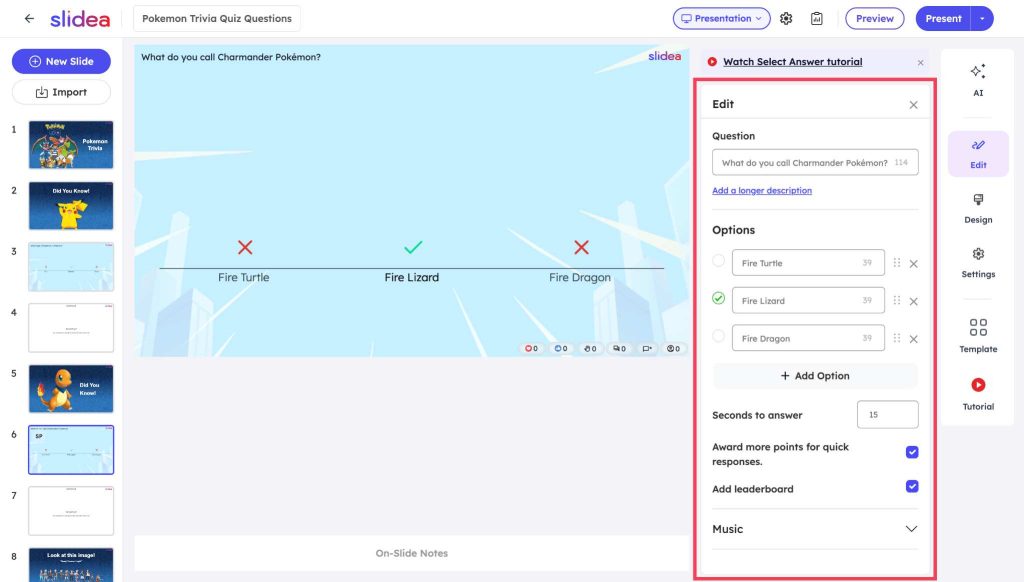
Its intended answer is “Fire Lizard", but this combines Charmander’s Fire type with its official Lizard category.
Replace it with:
“What is Charmander’s Pokémon category?”
Options:
- Turtle Pokémon
- Lizard Pokémon
- Dragon Pokémon
Correct answer: Lizard Pokémon.
This version asks for one specific fact and has one defensible answer.
2. Replace the broad collecting question.
The original question asks:
“What are Pokémon trainers trying to collect?”
“Badges” is selected as the correct answer, but the question is broad. Depending on the context, trainers may collect Pokémon, Poké Balls, cards, or other items.
Replace it with:
“What does a trainer receive after defeating a gym leader?"
Options:
- Poké Ball
- Playing Card
- Gym Badge
Correct answer: Gym Badge.
The revised version connects the answer to a specific action.
3. Make the Snorlax question objective.
The original question asks what Snorlax is “most known for". That wording is subjective, even when the intended answer seems obvious.
Replace it with:
“What is Snorlax’s Pokémon category?”
Options:
- Sleeping Pokémon
- Sprinting Pokémon
- Fighting Pokémon
Correct answer: Sleeping Pokémon.
This version can be checked directly against the official Pokédex.
How to edit the Pokémon quiz template
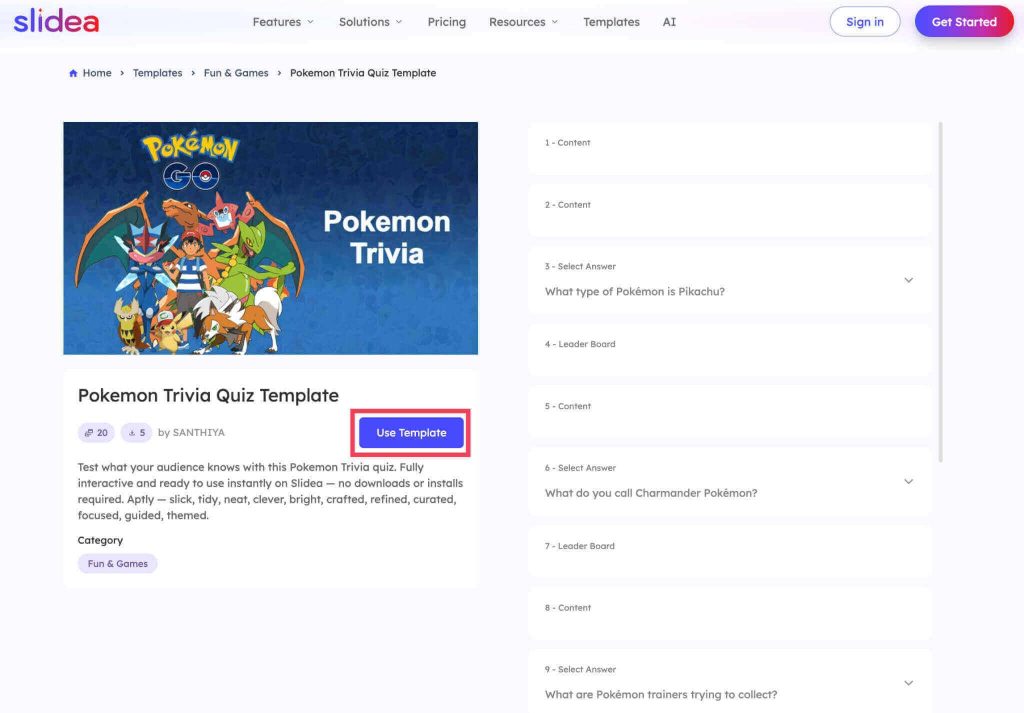
Step 1: Open the public template page.
If prompted, sign in before continuing. Begin from the public template page instead of sharing or saving a temporary editor URL.
When the template opens, the editor displays the presentation name, slide thumbnails, question controls, Preview, and Present.
Step 2: Select a question slide.
The six question slides are 3, 6, 9, 12, 15, and 18.
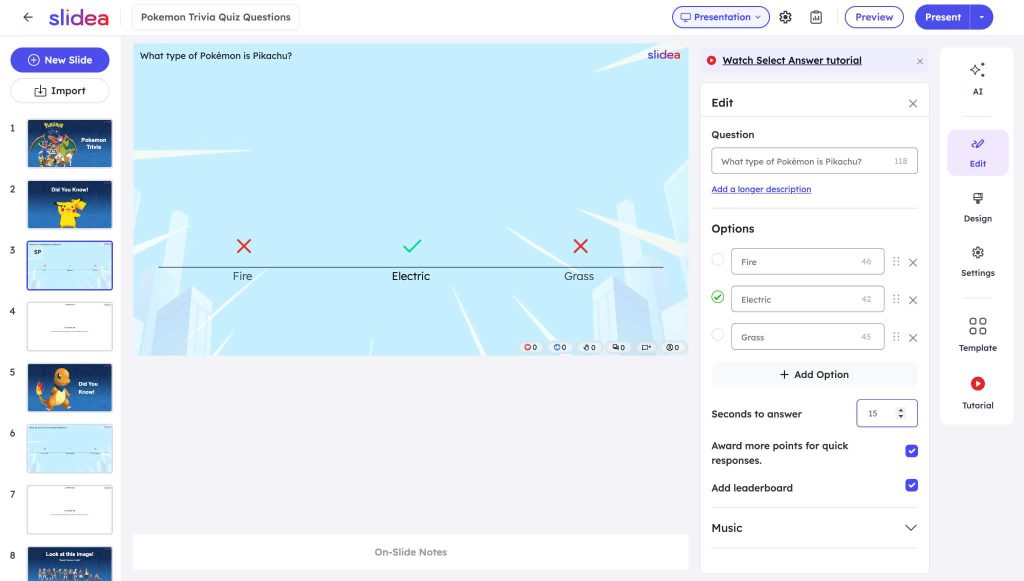
Select a question slide and open the Edit panel. The panel allows the host to review:
- The question
- The answer choices
- The selected correct answer
- Seconds to answer
- Faster-response points
- The leaderboard setting
Read every question aloud before presenting. If a question sounds unnatural or permits more than one reasonable interpretation, rewrite it.
Step 3: Choose an appropriate answer time
The template gave players 15 seconds for each question when tested.
That may be enough for confident adult players on a reliable connection. It may be too short for younger players, mixed-age groups, remote participants, or people using assistive technology.
Use these timings as starting estimates:
| Audience | Starting time per question |
| Confident Pokémon fans | 15 seconds |
| Mixed-age family or workplace group | 20–25 seconds |
| Younger classroom audience | 25–30 seconds |
| Questions being read aloud | 30–45 seconds |
These are not universal rules. Test the quiz with someone similar to the intended audience and adjust the timing based on their experience.
Step 4: Decide whether speed should affect the score
The tested template had “Award more points for quick responses” enabled.
In Preview, the participant screen displayed a scoring range from 200 to 1,000 points. During the test, a correct answer submitted in 13.69 seconds received 270 points on the following leaderboard.
The exact result depends on the response time and current settings.
Keep faster-response points when quick recall is part of the game. Turn the setting off when accuracy should matter more than speed.
Disabling speed-based scoring may be more suitable when:
- Questions will be read aloud
- Participants have different reading speeds
- The audience includes younger children
- Players are using different connection speeds
- The quiz is intended for learning rather than competition
Step 5: Test the participant experience in Preview
Select Preview before presenting.
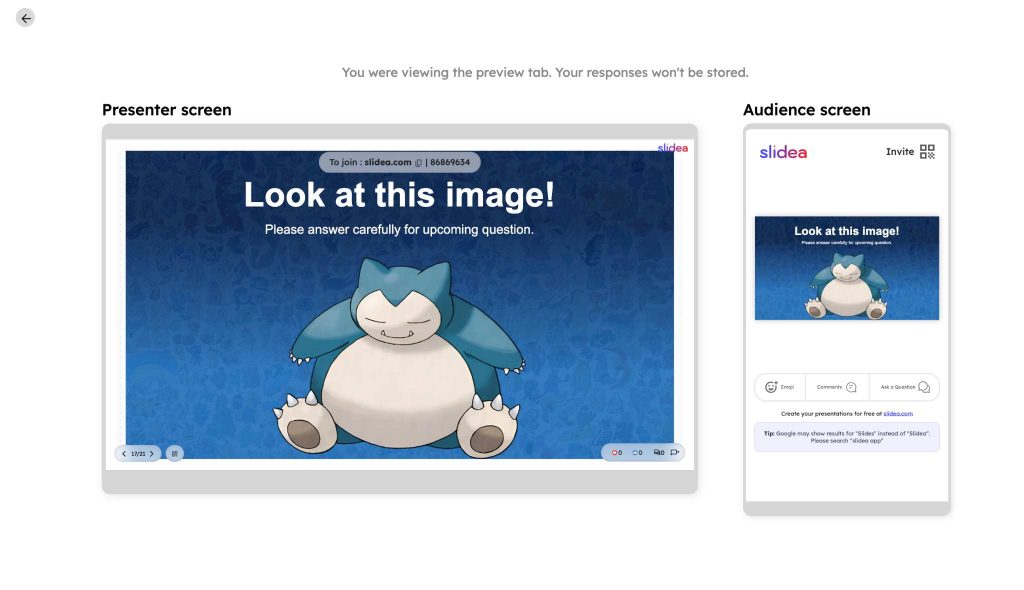
The tested preview displayed a presenter screen and an audience-sized screen side by side. The participant view included a display name, an avatar, and a 'Join quiz' button.
After joining, the host could:
- Start the quiz.
- Start the timer.
- Wait for the participant’s answer.
- Show the correct response.
- Move to the leaderboard.
The presenter view also displayed a text join code and a QR code control. Test both joining methods before the live session.
The template places a leaderboard after every question. That may suit a highly competitive group, but six ranking pauses can interrupt the flow.
For most short sessions, pause after questions two, four, and six.
| After the question | Leaderboard slide | Recommended action |
| Question 1 | Slide 4 | Move past it without a long pause. |
| Question 2 | Slide 7 | Pause and show the first standings. |
| Question 3 | Slide 10 | Move past it without a long pause. |
| Question 4 | Slide 13 | Pause and show the updated rankings. |
| Question 5 | Slide 16 | Move past it without a long pause. |
| Question 6 | Slide 19 | Announce the final result. |
This schedule keeps the competitive element without allowing the leaderboard to dominate the activity.
For a relaxed or learning-focused session, wait until the final question before discussing scores.
A practical 15-minute run plan
The following schedule is a starting point for a small or medium-sized group.
| Time | Slides | Activity |
| 0:00–2:00 | 1–2 | Welcome players, share joining instructions, and explain the rules. |
| 2:00–5:00 | 3–7 | Run questions one and two, then show the first leaderboard. |
| 5:00–8:00 | 8–13 | Run questions three and four, then show the second leaderboard. |
| 8:00–11:00 | 14–19 | Run questions five and six, then show the final leaderboard. |
| 11:00–13:00 | 19 | Announce the winner and discuss surprising answers. |
| 13:00–15:00 | 20 | Use a tie-breaker if required and close the activity. |
Allow additional time for remote joining, younger participants, or explanations after each answer.
A short script for the host
“Welcome to our six-question Pokémon quiz. Join using the code or QR code on the screen. Please use a first name, initials, or a team name. Each question has a time limit, and faster correct answers may receive more points. We will check the leaderboard after questions two, four, and six.”
Before each question, remind participants:
“Read all three options before submitting. A fast answer only helps when it is correct.”
After revealing an answer, provide one useful sentence:
- “Pikachu is an Electric-type Pokémon.”
- “Charmander’s type is Fire, but its official category is Lizard.”
- “Lugia is Psychic/Flying—the order used by the official Pokédex.”
Short explanations make the activity useful even for players who do not win.
How to adapt the quiz for different audiences
Children and classrooms
Increase the answer time and read every question aloud. Consider disabling faster-response points so reading speed does not determine the result.
Ask children to use initials, approved nicknames, or team names rather than full names. Follow the school’s privacy, technology, and content requirements.
Families and mixed-age groups
Place participants into teams so experienced fans can help beginners. Give teams a few seconds to discuss each question before starting the timer.
Avoid highly specialised questions unless every team includes an experienced player.
Workplace icebreakers
Keep participation light and optional. Team names may be more suitable than personal names when participants are uncomfortable appearing on a public leaderboard.
Do not treat the result as a serious measure of knowledge or performance.
Experienced Pokémon fans
The six included questions will probably feel easy. Replace some questions or add more fact-checked questions from official sources.
Difficulty should come from the knowledge required, not from vague wording.
Accessibility and inclusion checklist
Before presenting:
- Read the question and every answer option aloud.
- Provide enough time for players to understand and respond.
- Do not rely only on colour to indicate the correct answer.
- Use large text with clear contrast.
- Explain the scoring rules before the first question.
- Offer the visible text code as an alternative to the QR code.
- Disable speed scoring when it creates an unnecessary disadvantage.
- Use team names or initials when displaying personal names is unsuitable.
- Test the participant view on an actual phone.
- Prepare an alternative for anyone who cannot join digitally.
Common problems and practical fixes
Players cannot submit an answer.
Check whether the quiz and timer have started and whether voting is open. During the tested preview, the participant options became usable after the host started the quiz and timer.
The quiz feels rushed.
Increase the seconds-to-answer setting. If participants understand the questions but cannot submit in time, the problem is probably the timing rather than the difficulty.
The leaderboard appears too often.
Move past slides 4, 10, and 16 without pausing. Stop on slides 7, 13, and 19 instead.
A question causes disagreement.
Check whether more than one answer could reasonably fit. Rewrite the question around a specific fact and verify it with an authoritative source.
Beginners lose interest.
Use the content slides to provide a small clue before difficult questions, or place beginners and experienced players on the same team.
The final scores are tied.
Use this text-only tie-breaker:
“What is Snorlax’s National Pokédex number?”
Answer: 143.
Ask tied players to submit a number. The closest answer wins. This keeps the tie-breaker simple without introducing another image-rights decision.
When this template may not suit your session
This is a short, introductory Pokémon quiz. It may not satisfy an audience expecting a long or expert-level challenge.
Consider another format when:
- Players expect 20 or more questions
- Most participants have little knowledge of Pokémon
- Participants cannot use connected devices
- You need a formal assessment rather than a recreational activity
- Your organisation has not cleared the intended use of the included names or artwork
If the audience is unfamiliar with Pokémon, a broader activity such as a Guess the Song quiz may be easier for the group to enter.
Frequently asked questions
How many questions are in the Pokémon quiz template?
The template contains six multiple-choice questions, six leaderboard slides, and eight content slides, for a total of 20 authored slides.
What are the six correct answers?
The correct answers are Electric, Lizard Pokémon, Gym Badge, Psychic/Flying, Dialga, and Sleeping Pokémon.
The Charmander, Gym Badge, and Snorlax questions should be rewritten for greater clarity before presenting.
How long does the Pokémon quiz take?
A straightforward session takes approximately 10 to 15 minutes. Allow closer to 20 minutes for younger participants, larger groups, or discussions after each answer.
Should the leaderboard appear after every question?
No. Showing it after questions two, four, and six generally creates a smoother flow than stopping after every question.
Can the template be used in a classroom?
The template can be adapted for a classroom activity. Increase the timer, consider disabling speed-based scoring, and ask students to use team names or initials. Follow your school’s applicable privacy and technology policies.
How can the quiz be made more difficult?
Replace easy questions, improve the distractors, or add new fact-checked questions. Keep every question specific enough to have one defensible correct answer.
Final thoughts
The template provides a complete six-question sequence, but a successful session still depends on the host.
Correct the unclear wording, give the audience enough time, test the participant view, and avoid interrupting the game with too many leaderboard pauses. Those changes make the quiz easier to understand and more enjoyable for both beginners and experienced players.



Your email address will not be published. Required fields are marked *