


QUICK FIX
- Type slidea.com directly into your browser’s address bar and press Enter.
- Search for “slidea” on Google using quotation marks.
- Bookmark the site right now for instant, one-click access in the future.
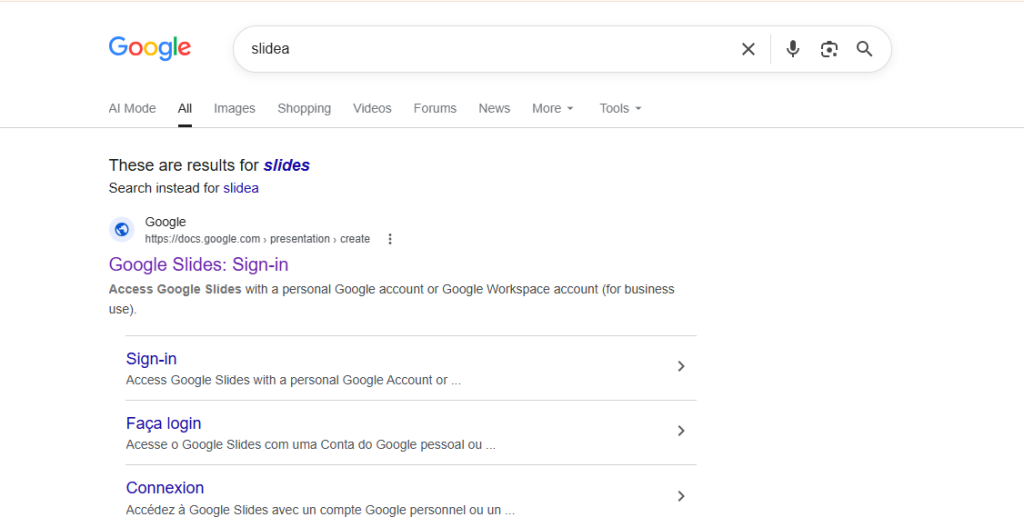
When you search for Slidea, our interactive presentation platform, Google’s automatic query correction may override your search and show results for “slides” instead. This happens because search engines are calibrated to predict user intent based on global search volume. Since “slides” is a far more commonly searched term, Google may treat “slidea” as an unintentional variation and redirect accordingly.
This is not a problem with Slidea itself. It only affects how search engines route your query. The four methods below will get you to Slidea instantly, without any search engine interruption.
Method 1: Type the Address Directly into Your Browser (Recommended)
The fastest and most reliable way to reach Slidea is to go directly to our website instead of using a search engine altogether.
- Click the address bar at the very top of your browser window.
- Type slidea.com and press Enter.
💡 Why this works: Entering the website address directly takes you straight to Slidea without going through any search engine routing, autocomplete suggestions, or automatic spelling corrections.
Method 2: Search Using Quotation Marks
If you prefer using a search engine, you can instruct it to search for our exact brand name by wrapping it in quotation marks.
- Open Google, Bing, or your preferred search engine.
- Type “slidea” including the quotation marks.
- Press Enter or tap Search.
💡 Why this works: Quotation marks tell the search engine’s algorithm to match only the exact term you entered, rather than automatically substituting it with a similar, higher-volume word.
Method 3: Bookmark Slidea for One-Click Access
Save Slidea as a bookmark so you never need to rely on a search engine to find us again.
On Desktop (Windows or Mac)
- Visit slidea.com.
- Press Ctrl + D (Windows) or Cmd + D (Mac).
- Click Done.
On Mobile (iPhone or Android)
- Open Slidea in your mobile browser.
- Tap the Share (iOS) or Menu (Android) button.
- Select Add to Home Screen or Add Bookmark.
💡 Why this works: Bookmarks and home-screen shortcuts bypass search routing entirely, giving you direct one-click access to Slidea every time.
Method 4: Create a Custom Browser Shortcut (Advanced)
If you use Slidea frequently, you can set up a two-letter browser shortcut that opens Slidea instantly from any new tab.
Google Chrome
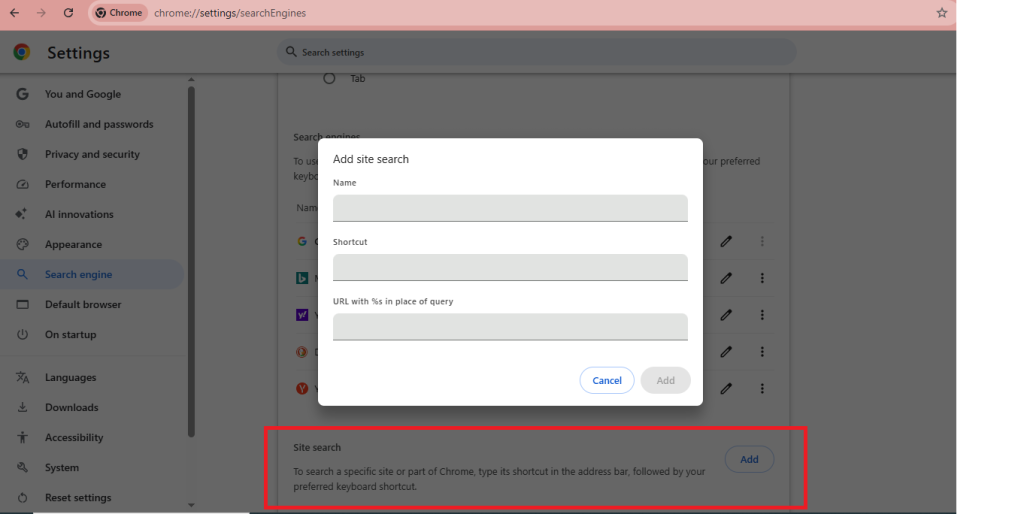
- Type chrome://settings/searchEngines in your address bar and press Enter.
- Scroll to the Site Search section and click Add.
- Enter: Search engine: Slidea | Shortcut: sl | URL: https://slidea.com
- Click Save.
Microsoft Edge
- Type edge://settings/searchEngines in your address bar and press Enter.
- Follow the same setup steps listed above.
How to Use It
- Open a new browser tab.
- Type sl into the address bar.
- Press Enter, you’ll land directly on Slidea.
💡 Why this works: Custom browser shortcuts open your saved URL directly, completely bypassing the search engine and its query correction behaviour.
What We’re Doing About It
We’re actively working to resolve this at the source. Our team is:
- Running branded search ads so Slidea appears prominently in results while our organic presence strengthens.
- Strengthening the signals that help Google recognise Slidea as a distinct brand including trusted references, structured data, and brand mentions across the web.
- Building our backlink profile so reputable sites link to Slidea by name, reinforcing our brand identity in search.
- Publishing Slidea-named content consistently so Google’s understanding of our brand strengthens over time.
Every branded search, bookmark, and direct link strengthens the signal that helps Google recognise Slidea correctly.
Frequently Asked Questions
Why does Google show results for “slides” instead of Slidea?
Search engines are calibrated to predict user intent based on global search volume. Because “slides” is searched far more often, Google’s automatic query correction may interpret “slidea” as an unintentional variation and redirect accordingly. Searching with quotation marks “slidea” instructs Google to match your exact term.
Is something wrong with Slidea?
No. This issue only affects how search engines route your query not Slidea itself. The platform works as normal. Use any of the four methods above to reach us without interruption.
Why am I seeing a verification or “I’m not a robot” message?
Google may occasionally show a CAPTCHA when it detects repeated or rapid search activity from the same browser or network. Completing the verification restores normal access immediately. To avoid it, access Slidea directly via the address bar rather than repeated searches.
What is the fastest way to access Slidea?
Type slidea.com directly into your browser’s address bar. This bypasses search engines entirely and takes you straight to Slidea with no redirection or autocorrection.
When will this be fixed permanently?
We’re working on it from multiple angles branded ads, entity recognition, backlinks, and content. As branded search signals grow, Google’s automatic query correction for “slidea” will weaken over time. In the meantime, the methods above provide reliable access.

Leave a Comment
Your email address will not be published. Required fields are marked *