


Do you want to collect input from your audience, or do you want them to compete against each other?
Slidea offers two main types of interactive slides designed for different goals: Question Slides and Quiz Slides. Understanding the difference helps you choose the right format for your session.
Question Slides (Interactive Slides)
Question Slides are designed to gather input, feedback, and opinions from your audience.
Slidea includes a wide range of Question slide types, such as:
1. Multiple Choice
Participants select one or more options from predefined choices. This is useful for polls, quick checks, and decision-making.
2. Word Cloud
Participants submit words or short phrases. Responses appear as a dynamic word cloud where frequently mentioned words become more prominent.
3. Open-Ended
Participants type detailed responses. This is ideal for collecting feedback, ideas, or descriptive answers.
4. Scales
Participants rate statements on a scale of 1 to 5. This is useful for surveys, feedback, and measuring opinions.
5. Ranking
Participants arrange items in order of preference or priority using drag-and-drop or arrow controls.
6. Q&A
Participants can submit questions during the presentation, making it ideal for discussions and live sessions.
7. Guess the Number
Participants guess a number within a defined range. This can be used for fun interactions or estimation activities.
8. This or That
Participants choose between two options, making it useful for quick comparisons or icebreakers.
9. Traffic Lights
Participants respond using simple signals like agree, neutral, or disagree for quick feedback.
10. Truth or Lie
Participants decide whether a statement is true or false, making it useful for engagement and quick knowledge checks.
How to Add a Question Slide
To add a Question slide:
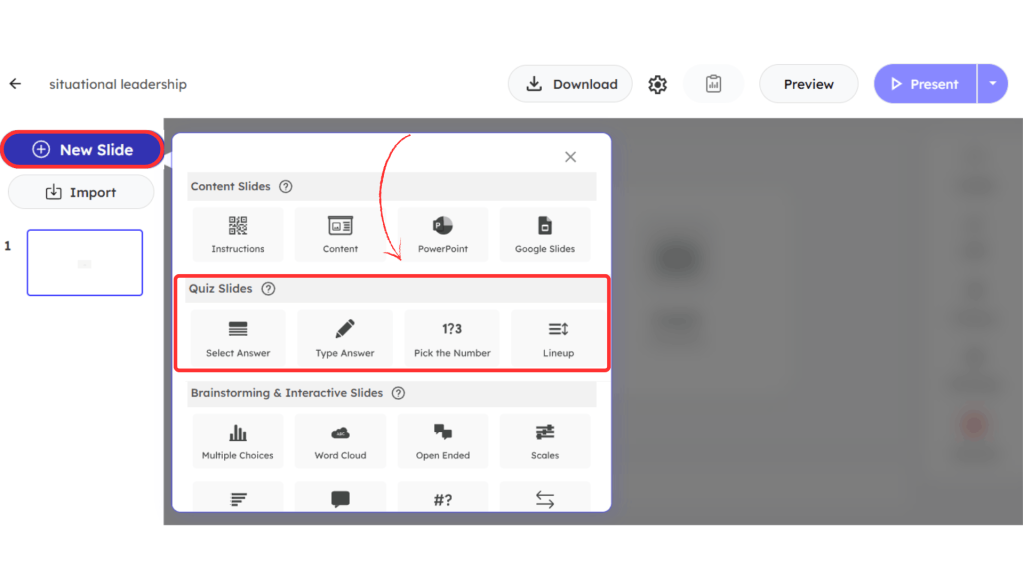
- Click + New Slide in the editor
- Choose any slide type under Brainstorming and Interactive Slides
- Customize your question and settings from the right-side panel

Quiz Slides
Quiz Slides are designed for competition and knowledge testing.
They allow you to:
- Set correct answers
- Enable countdown timers
- Award automatic points
- Add speed-based scoring
- Display a leaderboard
- Reveal a final winner
Slidea offers four Quiz formats:
1. Select Answer
Participants choose one correct answer from predefined options (similar to multiple choice).
2. Type Answer
Participants type the answer themselves. You can define accepted answers and variations. Responses are not case-sensitive.
3. Pick the Number
Participants guess a number within a defined range. You set:
4. Lineup
Participants arrange items in the correct order.
You define the correct sequence, and Slidea automatically shuffles the items during presentation.
Which Should You Choose?
Want feedback, ideas, or opinions? → Use Question Slides
Want competition, scoring, and a winner? → Use Quiz Slides
Both slide types help you create interactive presentations, the right choice depends on whether your goal is engagement through input or engagement through competition.


Leave a Comment
Your email address will not be published. Required fields are marked *