


What is Slidea?
Most decks are a one-way broadcast: you talk, the room listens. Slidea flips that. The moment you add an interactive slide, everyone in the room becomes part of the deck.
Anywhere you'd normally pause and ask "any thoughts?", drop in a slide that actually collects the answer: a vote, a typed response, a ranked list. People join from whatever device is already in their hand, nothing to install, and what they submit shows up on your screen while you're still talking.
It isn't a video-conferencing app; you present it inside whatever meeting tool you already use, and it isn't just a quiz app either. Content slides, scored quizzes, and self-paced surveys all live in the same deck.
The three pieces of a session
- A deck. Static and interactive slides, mixed in any order.
- A room. Present live with New Presentation, or send a self-paced New Survey link, the same deck either way.
- A result. Every response lands in a report you can export or turn into a leaderboard.
Every slide type, by category
The slide picker groups everything into three families. Which one a slide belongs to tells you what it's for before you've even opened it.
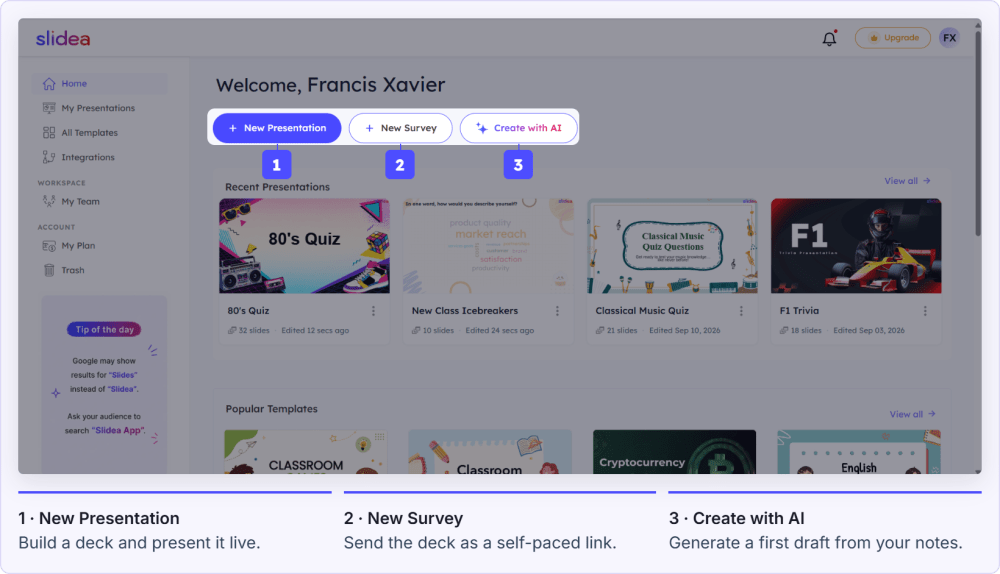
Everything starts from Home: build, generate with AI, or import.
Set up your account, then jump straight to building. Your first interactive slide takes under a minute to add.
Frequently asked questions
Does my audience need an account or an app?
No. They open a browser, enter a short join code (or scan a QR code), and they're in. No download, no sign-up.
Do I need to be presenting live to use Slidea?
No. If nobody's in the room at the same time, use New Survey instead of New Presentation. People complete it on their own schedule.
Is Slidea free to try?
Yes, the Free plan lets you build and run real sessions with no credit card required.