The Best Alternative to AhaSlides

Looking for more than just interactive slides? Slidea combines AI-powered slide creation, advanced engagement tools, and greater flexibility.

Slidea vs Menti Comparison

What Slidea Offers That AhaSlides Doesn’t

If you’re looking for more customization, deeper editing options, and higher participant limits, Slidea offers the flexibility that modern presenters need.

  • Annotation Tools

    Highlight, draw, and explain in real time to make sessions more interactive and engaging.

  • Remote Control Feature

    Control your presentation smoothly from anywhere without interrupting your flow.

  • Editable PDF Support

    Import PDF files and fully edit them as content slides.

  • Higher Participant Limits

    Engage larger audiences without worrying about hitting participation caps.

  • Advanced Presentation Control

    Greater flexibility in managing and customizing slides for professional use cases.

Slidea vs. AhaSlides

More Control. More Flexibility.

Feature / Capability Slidea AhaSlides
AI-Powered Slide Creation Advanced Basic
Quizzes Yes Yes
Brainstorming slides
10
6
Annotations Yes ❌ No
Remote Control for Presenters Yes ❌ No
Editable PDF Import Yes ❌ No
Import PowerPoint Yes Yes
Branded Customization Advanced Basic
Templates Library Extensive Fewer
Chart & Table Yes ❌ No
Participant Limit (Free plan) 100 50
Custom Domains / White Labeling Yes ❌ No
Start for free

Why Slidea is the Best?

AI Powered

The "AI" Advantage

Slidea helps you create presentation-ready slides instantly using AI.

You’re not just switching tools — you’re saving hours of preparation time.

AI Prompt Interface
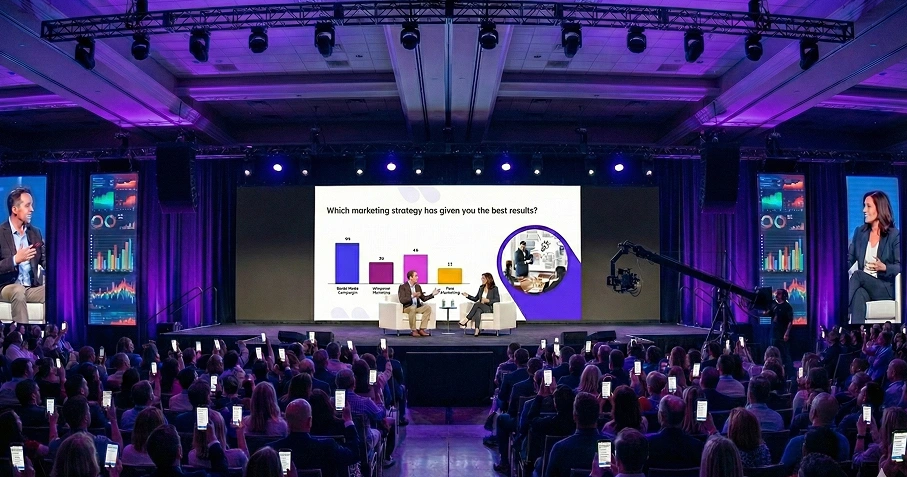
Audience in a large hall
No Limits

More Freedom for Engagement

With higher participant limits and advanced interaction tools, Slidea ensures your audience can fully participate.

Slidea
AhaSlides
Native Integration

Seamless Editing & Workflow

Import PPT or PDF files and edit them directly as content slides. Add annotations, customize layouts, and manage your presentation smoothly with built-in controls.

PowerPoint PowerPoint Zoom Zoom
Google Slides Google Slides
Microsoft Teams Microsoft Teams
Webex Webex
ChatGPT ChatGPT

Zoom Meeting with Slidea Integration

User Testimonials

The AI slide generation and annotation tools completely changed how I teach. I can explain concepts clearly and interact in real time.

DR

Daniel Reed

High School Teacher

We often host large workshops, and Slidea’s higher participant limit makes everything stress-free.

PN

Priya Nair

Corporate Trainer

Importing and editing PDFs directly saved us so much time. That flexibility really stands out.

AM

Alex Morgan

Product Manager

The remote control feature makes my presentations smooth and professional. I stay focused on my audience, not the tech.

SK

Sara Kim

Event Host

The combination of interactive slides and traditional content capabilities makes Slidea the best choice overall.

LB

Liam Brooks

Education Coordinator

Slidea’s annotation tools help me explain concepts live during sessions — that’s something I really missed before.

OH

Oliver Hughes

Workshop Facilitator

The AI slide generation and annotation tools completely changed how I teach. I can explain concepts clearly and interact in real time.

DR

Daniel Reed

High School Teacher

We often host large workshops, and Slidea’s higher participant limit makes everything stress-free.

PN

Priya Nair

Corporate Trainer

Importing and editing PDFs directly saved us so much time. That flexibility really stands out.

AM

Alex Morgan

Product Manager

The remote control feature makes my presentations smooth and professional. I stay focused on my audience, not the tech.

SK

Sara Kim

Event Host

The combination of interactive slides and traditional content capabilities makes Slidea the best choice overall.

LB

Liam Brooks

Education Coordinator

Slidea’s annotation tools help me explain concepts live during sessions — that’s something I really missed before.

OH

Oliver Hughes

Workshop Facilitator

The AI slide generation and annotation tools completely changed how I teach. I can explain concepts clearly and interact in real time.

DR

Daniel Reed

High School Teacher

We often host large workshops, and Slidea’s higher participant limit makes everything stress-free.

PN

Priya Nair

Corporate Trainer

Importing and editing PDFs directly saved us so much time. That flexibility really stands out.

AM

Alex Morgan

Product Manager

The remote control feature makes my presentations smooth and professional. I stay focused on my audience, not the tech.

SK

Sara Kim

Event Host

The combination of interactive slides and traditional content capabilities makes Slidea the best choice overall.

LB

Liam Brooks

Education Coordinator

Slidea’s annotation tools help me explain concepts live during sessions — that’s something I really missed before.

OH

Oliver Hughes

Workshop Facilitator

Frequently Asked Questions

1. How is Slidea different from AhaSlides?

While AhaSlides focuses on interactive slides, Slidea combines AI-powered slide creation, annotation tools, editable PDF support, and higher participant limits in one platform.

2. Does Slidea support editable PDF uploads?

Yes. Slidea allows you to import PDF files and edit them fully as content slides.

3. Can I annotate during live presentations?

Absolutely. Slidea includes built-in annotation tools to draw, highlight, and explain in real time.

4. Does Slidea support large audiences?

Yes. Slidea supports higher participant limits, making it ideal for classrooms, training sessions, and large events.

5. Does Slidea have AI slide generation?

Yes. Slidea uses AI to help you generate structured, ready-to-present slides quickly.

6. Is Slidea suitable for teaching and training?

Definitely. With annotation tools, AI assistance, and strong audience engagement features, Slidea works perfectly for educators, trainers, and corporate presenters.

G2 Review us & get rewarded Claim